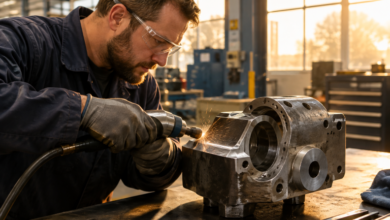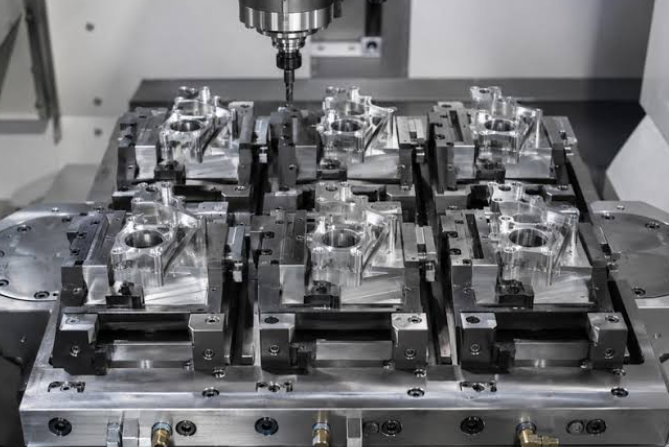

A finished CNC part begins with more than a cutting program. Before the first operation, you need to decide how the stock will be held, which surfaces will establish your references, and when important dimensions will be checked. Planning those details together helps each stage support the next.
For a component with cylindrical features, lathe tooling may handle the first machining operations. Other features, such as pockets or flats, may require milling. Once the part meets its requirements, identification can help connect the finished component to a drawing, production record, or assembly.
The right sequence depends on the part. A turned spacer with a milled flat needs a different approach from a rectangular mounting plate. Start with the drawing, identify the required features, and build your setup around them. A clear plan helps reduce unnecessary handling and makes problems easier to catch before they affect additional parts.
Turning and Milling Call for Different Cutting Tools
Turning and milling remove material in different ways. During conventional turning, the workpiece rotates while a cutting tool moves through the material. During milling, a rotating cutter removes material from a workpiece held in a fixture. Understanding that difference helps you choose an appropriate process for each feature.
Round stock often lends itself to turning when the drawing calls for outside diameters, shoulders, faces, or grooves. Rectangular stock may be a practical starting point for parts dominated by flat surfaces and pockets. However, stock shape alone does not determine the process. Feature geometry, tolerances, machine capability, and material availability all influence the decision.
Review the drawing before selecting cutters. Separate the features into a workable sequence and identify which dimensions depend on one another. For example, a faced end may become the reference for a shoulder location. Creating a reliable reference early helps you position later features and gives inspection a consistent starting point.
For turning operations, match the tool and insert to the material and cut. Roughing, finishing, grooving, and boring place different demands on cutting edges. A tool that removes outside stock efficiently may not have the clearance needed for an internal feature. Check the manufacturer’s application guidance before assigning one tool to several operations.
Plan tool access alongside workholding. The chuck or fixture must hold the material securely while leaving enough clearance for the cutting tool and holder. Excessive tool or workpiece projection can reduce rigidity. If later operations remove material near the gripping area, consider whether the remaining setup will still support the part adequately.
Milling introduces another group of selection decisions. Cutter diameter affects access to narrow spaces and the radius left in internal corners. Cutting length must suit the feature depth, while overall reach must provide clearance without unnecessary extension. Choosing the longest available tool can create avoidable stability problems.
When selecting end mills, consider the material, feature shape, flute geometry, and intended operation together. A cutter suited to an open profile may need a different approach when machining a deep pocket. Follow recommendations for cutting conditions and toolpath entry rather than assuming every cutter can plunge directly into solid material.
Moving a part between turning and milling also requires a reference plan. Decide how the second setup will locate the part relative to the features already machined. Suitable stops, soft jaws, or dedicated fixtures may help, depending on the geometry. Account for any surfaces that could be damaged by clamping.
Before running the program, verify tool lengths, work offsets, stock dimensions, and fixture clearances. Review the toolpath and follow the machine’s procedure for proving out a new setup. Build inspection checkpoints into the sequence so you can confirm critical features while corrections remain possible. These checks help keep an early setup error from carrying through the entire job.
Add Part Identification After Machining and Inspection
Once machining is complete, the part may still need cleaning, inspection, and identification before it is ready for use. Treat those steps as part of the manufacturing plan. A component that looks finished may still have a burr affecting assembly or a dimension that requires verification.
Begin with the drawing and inspection requirements. Check the features that control fit, function, and alignment using suitable instruments. Record the results when the job requires documentation. If a part fails inspection, keep its status clear so it cannot accidentally move forward as an accepted component.
Deburring and cleaning deserve a defined place in the sequence. Burrs can affect measurement, handling, and assembly, while chips or residue can interfere with later processing. Remove unwanted material without changing critical edges or dimensions. Confirm that the part’s condition is suitable for both final inspection and the intended marking method.
Next, decide what information the part needs. A part number may support identification, while a revision identifies the applicable design version. Serial numbers can distinguish individual components, and batch identifiers can connect parts to shared production records. Use the information required by the drawing or customer rather than adding markings without a clear purpose.
Choose the marking location before preparing the equipment. The area should be accessible and compatible with the part’s function. Avoid assuming that any open surface is acceptable. Sealing faces, bearing surfaces, thin sections, and other critical areas may have restrictions that need to be resolved in advance.
The timing of identification also depends on finishing requirements. Although marking may follow machining and inspection, coating, heat treatment, or other processes can change the best sequence. Confirm whether the mark must remain visible after finishing and whether the specified process affects its appearance or durability.
Establish a repeatable way to position the part. A suitable fixture can help keep identification in the correct location across a batch. Verify orientation, text, revision, and variable information before processing production pieces. For serial numbers, confirm that the numbering procedure prevents duplication and connects each identifier to the correct record.
For compatible materials and applications, laser marking can add identification as part of a controlled production workflow. Results depend on the material, surface condition, equipment, and settings. Validate the process on suitable samples, follow the equipment’s safety instructions, and inspect the finished mark for readability and compliance with the job requirements.
A dependable CNC setup connects every stage, from securing raw stock to checking the final identifier. Choose cutting tools around the features, preserve useful references between setups, and verify the part before it moves forward. Planning the complete route helps you produce components that are accurately machined, clearly identified, and ready for their next step.